Andera AI SOX
Business impact
Andera secured a commitment from a $250m company to move their auditing workflow from Auditboard to Andera.
Summary
Andera is a tool that automates SOX auditing using AI. I was brought in as the first product designer to shape the product end-to-end, starting with their core editor tool. At this early stage, Andera had validated client interest but had no product yet, so I partnered closely with the founders, auditors, and control owners to map out workflows and translate complex auditing processes into an intuitive, scalable platform.
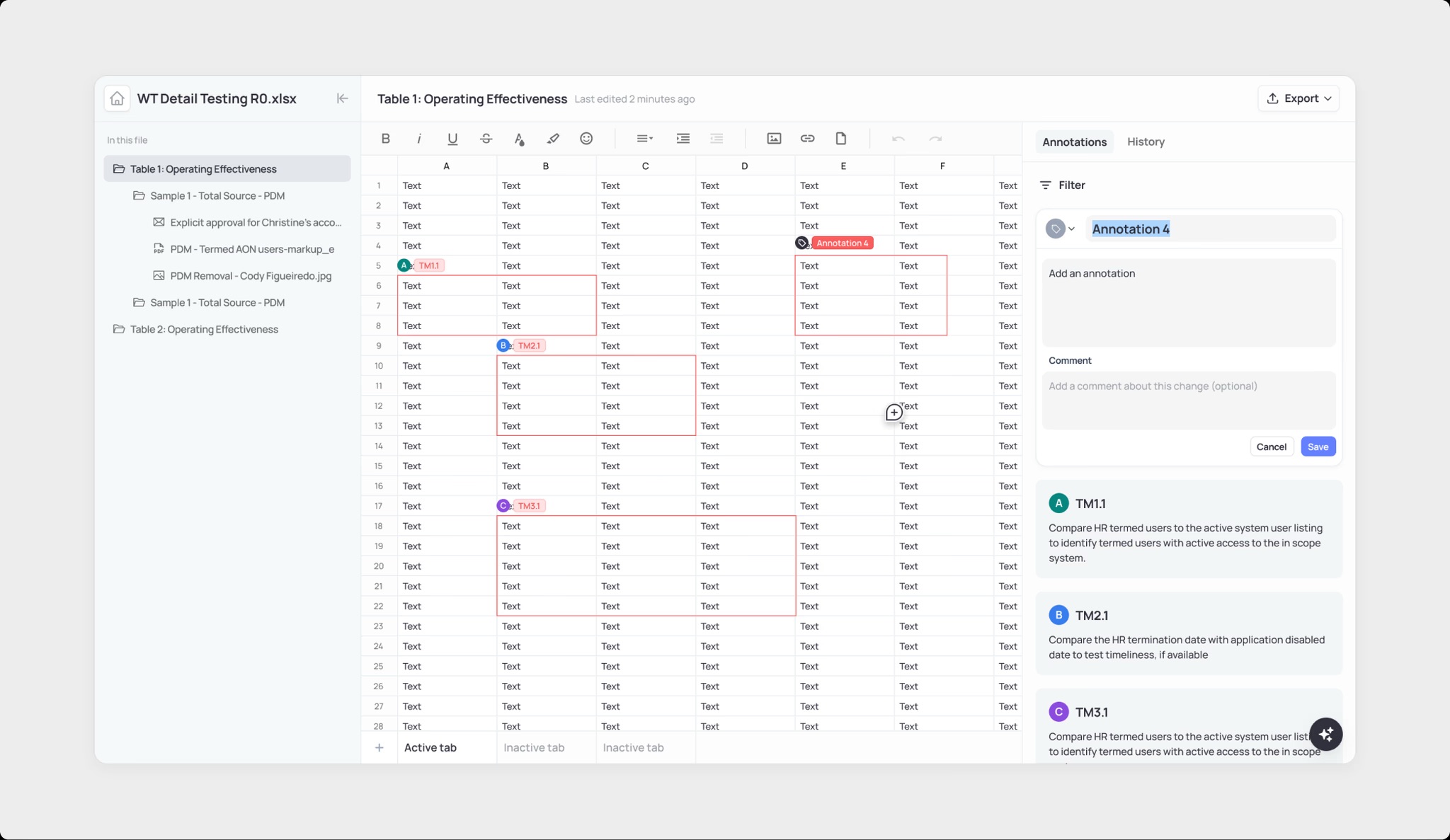
In just two weeks, I designed an AI-powered editor that turned hours of manual review into minutes—blending the familiarity of Excel with the speed and transparency of AI. The design not only streamlined workflows but also convinced a $250M prospective client to move their auditing process from Auditboard to Andera, validating the product vision and setting the foundation for future features like dashboards and multi-level collaboration.
Why existing tools fall short
SOX auditing is manual, repetitive, and difficult to scale. Industry leading tools like Workiva and Auditboard don’t allow users to mark up documents in the tool, and require auditors to download each document, markup in Excel, and reupload each document for further reviews. As a result, auditors spend hours highlighting documents, linking evidence to controls, and reporting results in fragmented systems.
Where auditors struggle today
- Manual Annotation: Annotations written out manually by an auditor.
- Repetitive Updates: Renaming or adjusting annotations requires multiple steps. Existing tools are so broken that simple actions such as renaming an annotation requires the user to update it on multiple surfaces.
- Fragmentation: Reviewers jump between files, annotations, and reports from Excel, to Workiva/Auditboard, to Jira
Principles I kept in mind
- Design for familiarity
Whether while exploring designs for annotation styling or interface layout, I leaned on patterns auditors already knew. For example, auditors strongly preferred red highlights because they matched industry standards, and keeping annotations in a right-hand panel with tabs at the bottom mirrored Excel. By aligning with conventions, the editor felt familiar from the start, creating trust in a new tool without forcing users to relearn a new pattern.
- Keep auditors in control
AI was designed as an assistant, not a replacement. Auditors can edit, remove, or add annotations manually, ensuring they stay in charge of the review process while benefiting from AI-generated speed and consistency.
- Optimize for efficiency
A key goal was to cut down on repetitive, manual tasks. Features like inline renaming of annotation titles and global updates ensured that auditors no longer had to make the same change in multiple places, saving time and reducing errors.
We want to build an AI-enabled editor that brings the entire audit workflow into one place. The editor should allow auditors to review and edit documents directly in-platform, see how annotations connect to control requirements, and make quick global updates without repetitive work. With built-in AI assistance, auditors can re-annotate or rephrase results in a single step, while retaining full control and transparency over the process.
How visible should AI be?
One of the key challenges was deciding how visible the AI should be in the editor. Should it work quietly in the background, or should its presence be more explicit? I explored two main directions: a conversational model where users could go back-and-forth with the AI, and an inline approach where suggestions were embedded directly into the workflow.
Inline chat was great for quick actions—like re-annotating or rephrasing—but limited in that the AI couldn’t easily ask clarifying questions. A conversational model, on the other hand, created room for richer back-and-forth, including project-wide actions rather than edits tied to a single annotation. The goal was to strike the right balance between making AI feel helpful and approachable without overwhelming auditors or adding unnecessary complexity.
Designing with traceability in mind
Because audits are highly regulated, it was critical to design for accountability. I explored ways to make it clear which annotations came from the AI and which were added or edited by an auditor. This included concepts like visible labels, version history, and the ability to revert changes. The intent was to ensure that auditors always had a reliable audit trail—so every edit was transparent, traceable, and reversible.
Highlighting without overwhelming
Another area of exploration was how annotations should be styled and how their states should be represented. I tested variations in color coding, borders, and hover states to make sure highlights were both noticeable and non-distracting. The challenge was to make annotations easy to parse without cluttering the document or creating cognitive overload.
Designing how annotations are edited
I explored whether edits should happen directly on the page, like Figma comments, or in a structured right-hand panel. Inline editing made it easy to quickly rename AI-generated titles (often formatted as codes likeTM1.1), while the panel approach offered more structure for adding attributes such as “reviewed” or linking to specific controls. The goal was to balance speed for simple edits with flexibility for more detailed metadata—while also ensuring the format would work seamlessly for exported PDFs that auditors rely on.
Final design
What once took hours can now be done in minutes. The editor blends the familiarity of Excel with AI speed—letting auditors review documents in-platform, trace annotations to requirements, and make global updates effortlessly, all while staying in full control.
Business impact
After demoing this design to a $250M client, Andera secured a commitment from the client to move their auditing workflow from Auditboard to Andera.
What's next?
Beyond solving today’s pain points, the design also lays a strong foundation for future features like updating review status per annotation and supporting multi-level reviews with multiple auditors working in the editor together.